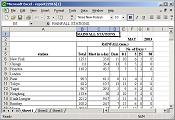
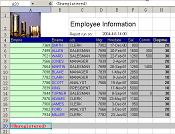
Oracle Reports is a comprehensive reporting tool for
enterprise wide reporting, information delivery, analysis
and decision-making. But you will find it is difficult
to generate spreadsheet output from oracle reports.
We introduce an easy, low cost way to output rich format
excel report.
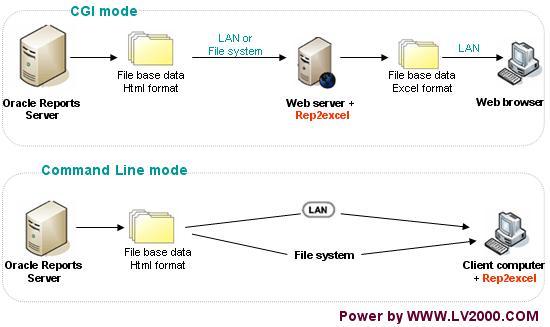
Rep2excel is a win32 console application, It can convert
.html file generated by oracle report server (6i, 9i,
10g and 11g etc.) to ms-excel format, you can access the output excel
file via browser. We also offer java-based Rep2excel for Linux and other platform, for more information, please view the j-Rep2excel.
Rep2excel can convert report not only in HTML but also
in HTMLCSS format to excel format.
Excel file can be sent by email to be shared between
users
.
You can install the application inside Apache server
as CGI application. You can using 'web.show_document'
built-in to invoke the application to convert the
oracle report to excel thru web-browser .[See Live
Demo]
Please click here
to download an sample code demonstrates how to call
rep2excel from oracle forms.
Quick start (More information at the User's
Guide )
Call Rep2excel through web
Please see the Live
Demo
- Install a web server such as Apache ( Oracle http
server is based on Apache ).
- Copy rep2excel.exe to the directory ORACLE_HOME\apache\apache\cgi-bin\
.Invoke the program by URL http://your_server_name:7777/cgi-bin/rep2excel.exe
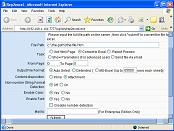
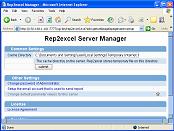
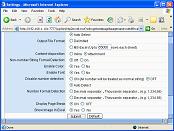
.the software runs, a web page will appear .
- Generate a report file in html or htmlcss format
by oracle report server and save to c:\example\ ,the
file name is report.htm
- Open IE, call the application follow the URL
http://your_server_name:7777/cgi-bin/rep2excel.exe?baseidr=c:\example\&filename=report.htm
.
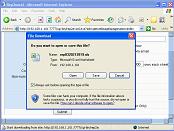
- Now , What you need is inside
web-browser!
Call Rep2excel through command line
Please see the Live
Demo
Try Rep2excel now?
Step 1: Download the trial version of Rep2excel. Please click Download Rep2excel
Step 2: Install Rep2excel. Please see document: Install Rep2excel
Step 3: Call Rep2excel to convert sample report file. Please see document: Call Rep2excel
Step 4: Integrate Rep2excel into your application. Please see Call Rep2excel from your application



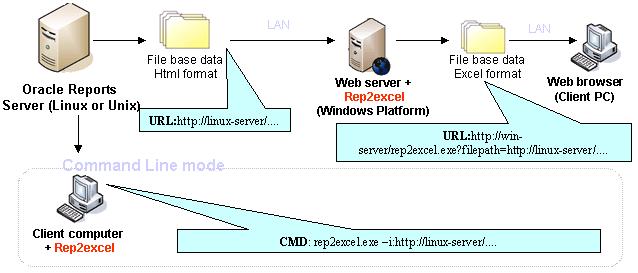
FAQ: My report server is running
on Unix, how can I do to use Rep2excel.
A: The are two solutions.
1) Please try the following:
- Install rep2excel and MS Office on a windows
server.
- Invoke rep2excel and specify filepath=URL. (rep2excel
can download files from another server).
e.g. http://dali:7777/cgi-bin/rep2excel.exe?filepath=http://www.lv2000.com/examples/getreport.php
The figure below demonstrate how the work with Report
Server on non-windows server.
2) Use the j-Rep2excel. The j-Rep2excel is developed by java, so it can be install on a lot of platform. For more information, please see the faster java-based Rep2excel.
j-Rep2excel The faster Rep2excel
The Rep2excel is developed by C++. It supports Windows platform only. Perhaps you want to installl Rep2excel on the Linux or Unix, we know your requirements, so we develop the j-Rep2excel by Java language.
 The j-Rep2excel is completely written in Java. It runs on every platform (OS) that supports Java 5 or higher (e.g. Windows, Unix, Solaris, OSX 10.4+, AIX). A GUI is not required for the server.
Compare Rep2excel and j-Rep2excel
| |
Rep2excel |
j-Rep2excel |
| Operating System |
Windows |
Windows and Linux etc. |
| Support web |
Yes |
Yes |
| Support command line |
Yes |
No |
| Number format detection |
Good |
Better |
| Speed |
Slow for native format
Fast for compatible format |
Fast for native format |
| Oracle SSO |
Yes |
Yes |
| Microsoft Office |
Require |
Unrestricted |
Try j-Rep2excel on Windows
- Download self-extractive file of j-Rep2excel, click Here to download.
- Run the self-extractive file, extract the installation pack to a folder.
- Double click startup.bat, start the server.
- Open IE browser, visit http://localhost:8003/.
- Convert the sample reports, get rich-formated excel output.
 Live demo of step 2-4 is available, please click here and see.
Note: If you want to uninstall, just remove the folder created at step 2.
Try j-Rep2excel on Non-Windows
Please download the free trial version. To learn more on installing and using j-Rep2excel, please see the online HELP document.
Try j-Rep2excel without download and installation
You can also try the online server, http://107.148.42.132:8003/ .
Download Trial Version
 You can download and try a free trial version of
Rep2excel and test it before purchasing:
You can download and try a free trial version of
Rep2excel and test it before purchasing:
 Download Rep2excel
Note: To download Rep2excel for Windows 2000, please contact support@lv2000.com.
Download j-Rep2excel
Ordering Information
 The free trial usage period of
Rep2excel is 60 days. If you would
like to use this software after the 60
days evaluation period; a registration is required.
You can order the fully licensed version of Rep2excel
over the Internet with any major credit card.
The free trial usage period of
Rep2excel is 60 days. If you would
like to use this software after the 60
days evaluation period; a registration is required.
You can order the fully licensed version of Rep2excel
over the Internet with any major credit card.
Please click
here for more inforamtion.
Support
Feedback, questions and bug reports are welcome and should
be sent to the customer support, at support@lv2000.com.





 The
Rep2excel is developed for Oracle Report; it can convert
oracle report output to excel format. In other words
it can enhance your Oracle Reports Server to generate
output with rich formatting from paper layout reports
to Excel format
The
Rep2excel is developed for Oracle Report; it can convert
oracle report output to excel format. In other words
it can enhance your Oracle Reports Server to generate
output with rich formatting from paper layout reports
to Excel format 


 Product Home Page